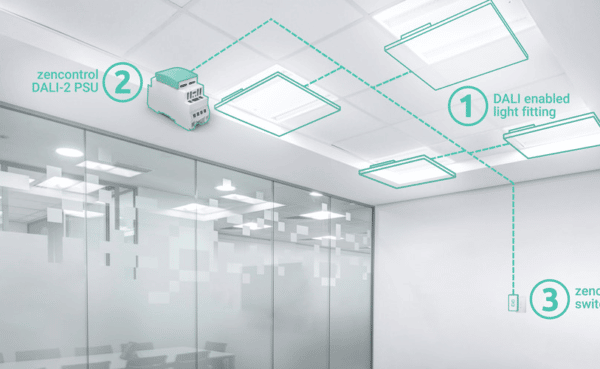
In complex buildings, the challenge is rarely a lack of information.
Most facility managers, consultants, contractors and building owners already have access to drawings, equipment schedules, device lists, test reports, maintenance logs and system data. The real challenge is bringing that information together in a way that is clear, accessible and useful when decisions need to be made.
That is where Plan View within the zencontrol platform becomes so valuable.
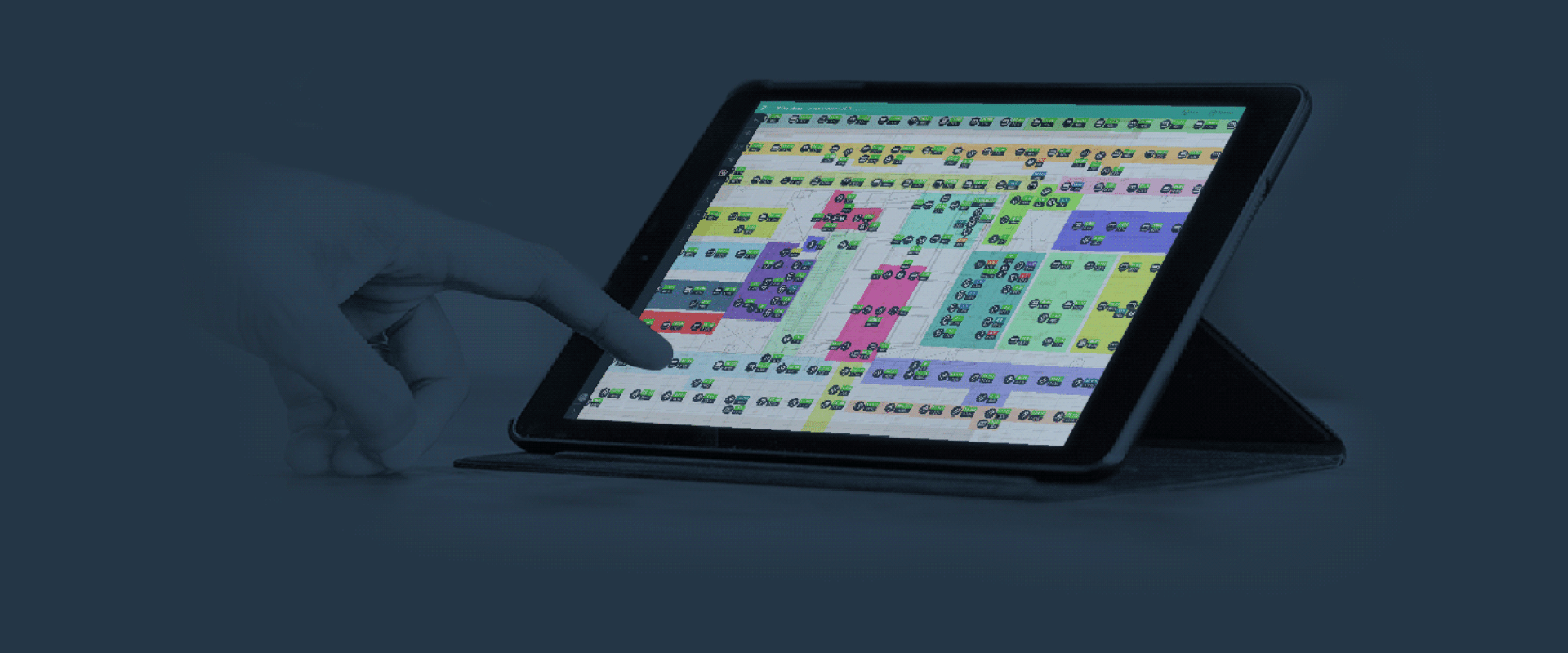
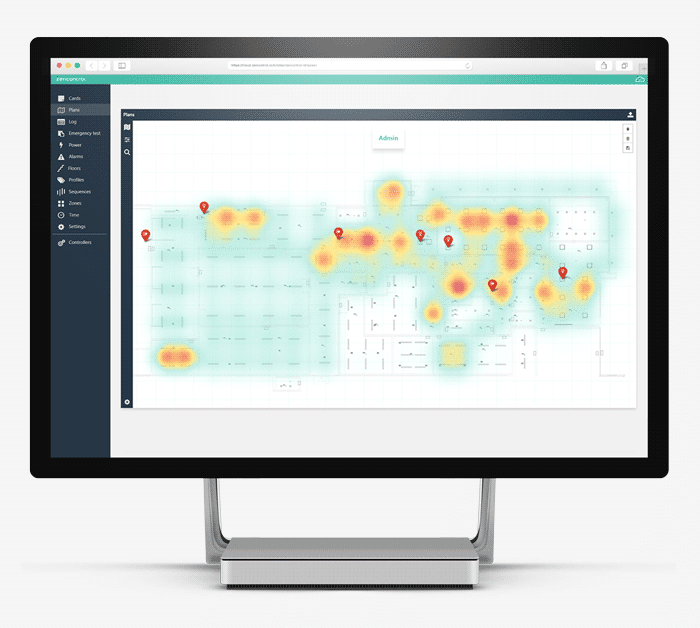
Plan View allows users to interact with a building directly from its floor plan. Instead of working from device IDs, spreadsheets or separate drawings, users can view lights, sensors, switches, emergency fittings, groups, issues and control systems in the context of the building itself.
For senior management, it provides visibility.
For facility teams, it provides clarity.
For maintenance contractors, it provides speed.
For engineers, architects and integrators, it provides a more intuitive way to review, commission and refine a lighting control system in line with the actual built environment.
It is a simple idea with significant operational value: use the floor plan as the interface.
From Static Drawings to Live Building Intelligence
Every building starts with plans. But once a building is operational, those plans are often disconnected from the systems that keep the building running.
Plan View changes that by bringing architectural drawings and live lighting control data together inside the zencontrol platform.
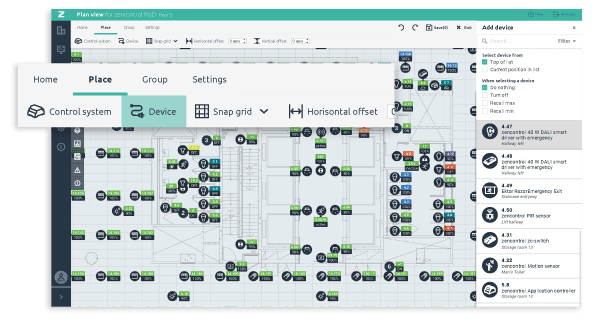
Floor plans can be uploaded for each level or area of a site. Devices and control systems are then placed directly onto those plans, reflecting their physical location in the building. Once configured, the plan becomes more than a reference drawing. It becomes a live, interactive view of the lighting control environment.
Lights, sensors, switches and emergency fittings are no longer just items in a list. They are shown in context.
That matters because buildings are physical environments. People do not think in device IDs. They think in rooms, corridors, floors, tenancies, plant areas, escape routes and shared spaces.
When information is presented visually, it becomes easier to understand what is installed, where it is located, how it is performing and what needs attention.
Why Visual Context Matters
For simple sites, a list-based interface may be manageable.
For larger commercial buildings, healthcare facilities, education campuses, retail environments, public buildings or multi-tenant properties, complexity increases quickly.
There may be thousands, or even tens of thousands, of devices across multiple floors and buildings. There may be different user groups, access permissions, emergency lighting requirements, tenancy boundaries, plant areas, specialist zones and operational priorities.
In that environment, visual context is not just convenient. It reduces ambiguity.
Plan View allows different stakeholders to understand the same system from the same spatial reference point.
- A facility manager can see issues across floors and tenancies.
- A maintenance technician can identify the exact fitting that requires attention.
- A consultant can review coverage, zoning and emergency layouts against the building plan.
- An integrator can commission and adjust systems with a clear understanding of where each device sits within the physical environment.
- A tenant can view and manage their own area without visibility over the rest of the building.
The result is a more intuitive and practical way to manage lighting control, particularly in buildings where clarity, compliance and operational efficiency matter.
Faster Fault Finding and Maintenance
When a fault occurs, one of the most time-consuming parts of the process is often finding the problem.
A device may be identified by name, ID, floor, circuit or group, but that does not always translate quickly to a physical location. Maintenance teams may need to cross-reference reports, drawings, spreadsheets or commissioning documentation before they can act.
Plan View shortens that process.
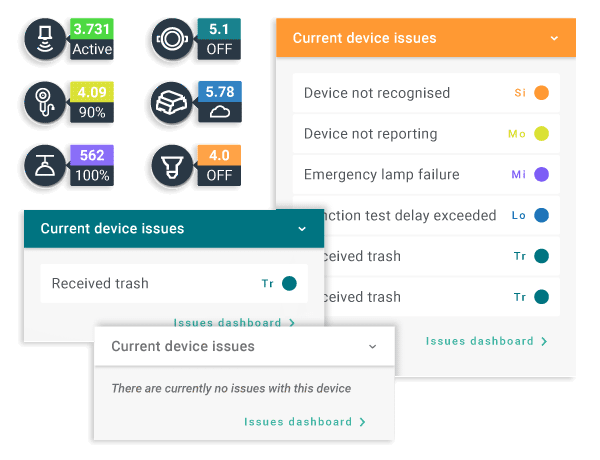
Issues are displayed directly on the relevant floor plan, with visible fault icons that make problem areas easy to identify. Users can zoom in to the exact room, corridor, fitting or escape path and access details such as device type, fault type and associated test results.
For emergency lighting, this is particularly useful.
Emergency lighting maintenance is not just about knowing that a fitting has failed. It is about knowing where that fitting is, whether it affects an escape route, whether it has been repaired, whether it still requires re-testing and whether the process has been recorded properly.
When combined with zencontrol’s test manager, Plan View supports a more traceable, location-based maintenance workflow. It helps teams move from issue identification to action faster, while maintaining a clearer record of what has been done.
For building owners and facility managers, that means less guesswork, fewer delays and better visibility over maintenance priorities.
A Practical Control Surface, Not Just a Monitoring Tool
Plan View is not limited to fault finding. It also acts as a control surface.
Users can interact with lights, sensors, switches, groups and scenes directly from the floor plan. They can view settings, adjust key parameters, change light levels, refine scenes, update groupings and review targets within the context of the space.
This is important because lighting performance is experienced physically.
A boardroom scene, a corridor lighting level, a classroom setting or a public-area sequence cannot be properly judged from a spreadsheet alone. It needs to be assessed in relation to the space, how the area is used and the outcome the lighting is intended to support.
Plan View gives integrators and facility teams the ability to make those adjustments with better context.
For example, light levels can be adjusted room by room while standing in the space and seeing the effect. Groups can be reviewed against the actual layout. Comfort, power or lux targets can be viewed and refined in line with design intent, operational use and energy goals.
This supports better commissioning and more effective post-occupancy tuning.
It also makes everyday building management more practical. Tasks that might otherwise require specialist system knowledge become more accessible to authorised users through a familiar plan-based interface.
Better Alignment Between Design Intent and Operation
One of the common challenges in building technology is the gap between design, commissioning and long-term operation.
A system may be designed with clear intent, installed to specification and commissioned correctly, but over time the building changes. Tenancies shift. Spaces are repurposed. Occupancy patterns change. Energy priorities evolve. Maintenance requirements increase.
Plan View helps bridge that gap by keeping the system connected to the building layout.
Engineers, architects, planners and consultants can review lighting control zones, emergency lighting layouts, sensor coverage and device placement in a way that reflects the physical environment. Facility teams can continue to manage and refine the system as the building changes.
That creates a stronger connection between the original design intent and how the building performs in real life.
For owners and senior decision makers, this matters because a lighting control system should not be static. It should be able to respond to operational needs, support sustainability goals, improve user experience and provide the information needed to make better asset management decisions.
Plan View makes that easier by turning system data into something that can be seen, understood and acted on.
Cloud, Onsite and Portfolio Visibility
Different buildings have different operational and IT requirements.
Some organisations want centralised cloud-based visibility across multiple sites. Others prefer local management through onsite software, particularly where network isolation, resilience or operational control is a priority.
Plan View supports both models.
Through the zencontrol cloud, Plan View can form part of a multi-site or multi-tenant portfolio view. This allows authorised users to access plans, devices, issues and controls across different buildings, with central logins, access control and cloud backup of configurations and plans.
For sites that prefer local management, Plan View can also be used as part of zencontrol onsite software, providing the same familiar visual interface within a local environment.
This flexibility is important for organisations managing large or complex assets. It allows the system to support different operating models without losing the benefit of a plan-based view.
Whether the priority is centralised governance, local resilience, portfolio reporting or site-specific control, Plan View gives teams a practical way to visualise and manage the lighting control environment.
Tenancy-Aware Control and Governed Access
In multi-tenant buildings, visibility and control must be carefully managed.
Not every user should see every area. Not every user should be able to change settings. Tenants may need access to their own spaces, while base-build areas, other tenancies and critical systems remain restricted.
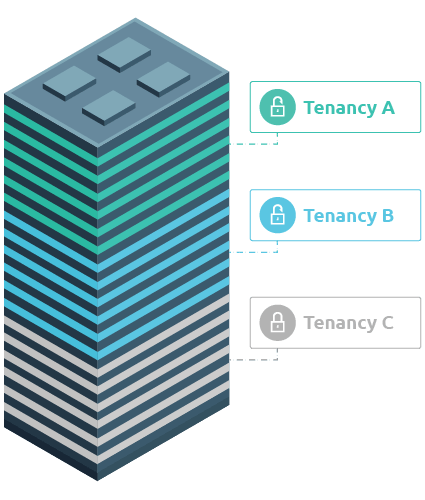
Plan View is integrated with zencontrol’s user access control and tenancy model, meaning users only see the sites, floors, areas and devices they have permission to access.
With the right access permissions in place, tenants can view or manage their own leased areas from the floor plan, while base-build and other tenancy areas remain protected. Contractors can be given scoped access to the areas they are responsible for. Central facility teams can retain a whole-of-site view across the building or portfolio.
Permissions can also define whether a user can simply view information, control lighting, modify configuration or carry out commissioning actions.
This is critical from a governance perspective.
As buildings become more connected and more data-driven, access control is no longer a minor detail. It is part of responsible system management. Plan View supports that by ensuring the visual interface respects the same boundaries and permissions as the rest of the zencontrol system.
Combined with audit trails, this creates a more traceable environment where changes can be reviewed and attributed.
Built for Real Buildings at Real Scale
The value of Plan View becomes even more apparent as buildings increase in size and complexity.
Large campuses, hospitals, education facilities, commercial towers, retail centres and public buildings often require systems that can handle many thousands of devices while still providing practical visibility at floor level.
Plan View is designed to support that scale.
A user can move from a high-level view of a site or building down to a specific floor, area, device or issue. Filters and layers can be used to show or hide devices, groups, faults, emergency fittings and other overlays, allowing teams to focus on the information that matters at that moment.
This is where the plan-based interface becomes powerful.
It allows a complex system to remain understandable.
It gives senior stakeholders enough visibility to understand performance and risk, while giving technical teams the detail they need to act accurately.
Why This Matters for Building Owners and Decision Makers
Lighting control is no longer just about switching, dimming or scheduling lights.
A modern lighting control system can support energy efficiency, compliance, maintenance planning, space utilisation, comfort, operational resilience and long-term asset performance.
But to unlock that value, the system needs to be usable.
Plan View helps make lighting control more accessible, more visual and more operationally relevant. It allows teams to move faster, understand issues more clearly, reduce reliance on spreadsheets and device lists, and manage complex buildings through an interface that reflects the building itself.
For decision makers, that means better oversight.
For facility teams, it means fewer barriers to action.
For consultants and integrators, it means better alignment between system design and real-world operation.
For tenants, it means appropriate control within clear boundaries.
And for building owners, it means the lighting control system becomes easier to manage, easier to maintain and easier to optimise over time.
A Smarter Way to Interact with the Built Environment
The best technology does not add unnecessary complexity. It makes complexity easier to manage.
Plan View does exactly that.
By turning floor plans into live, interactive building interfaces, zencontrol gives users a more intuitive way to understand and control their lighting environment.
It connects the physical building with the digital system behind it.
It gives teams the clarity to act quickly.
And it helps ensure lighting control continues to deliver value well beyond installation and commissioning.
For Intelligent Environments, this is where smart lighting control becomes part of a broader building performance conversation – not just controlling light, but helping people better understand, manage and improve the spaces they operate every day.
Planning your next project? Talk to Intelligent Environments about how Plan View can help you create a smarter, more visible and easier-to-manage lighting control system.